

Easy setup
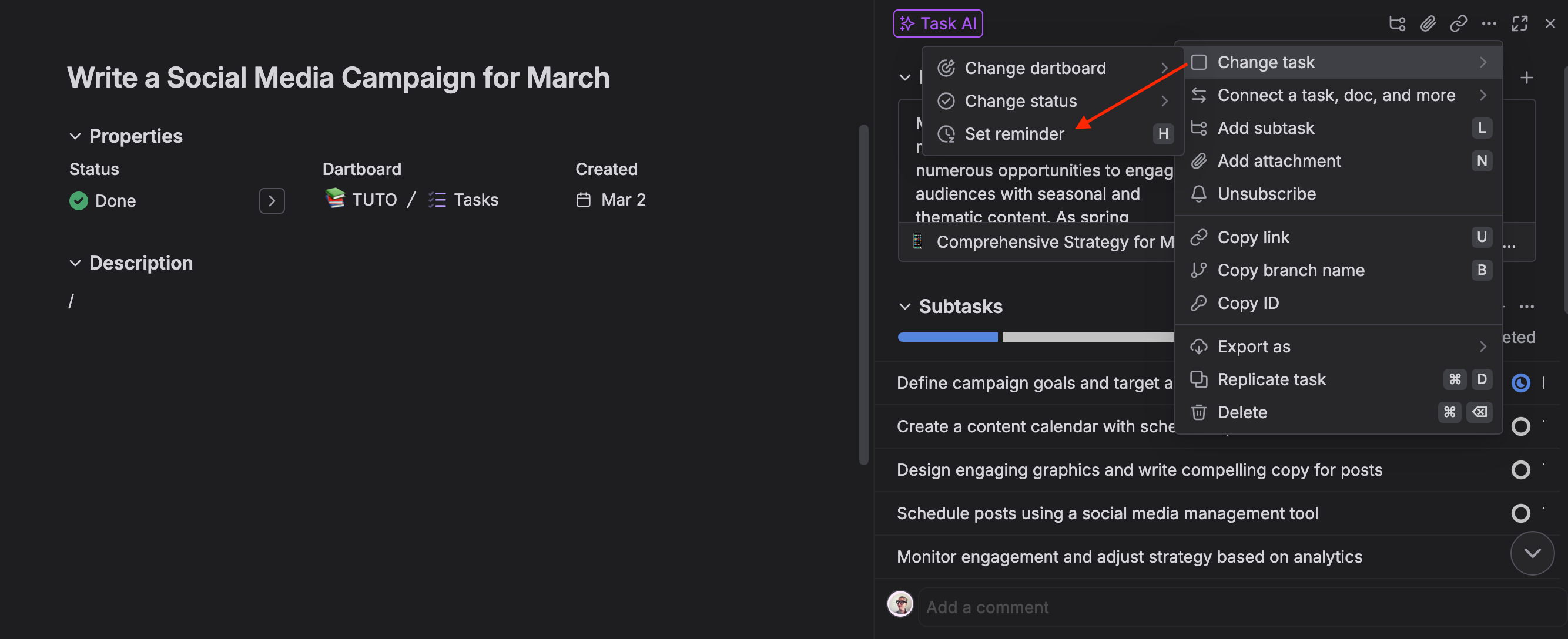
- Set reminders manually: Click the more icon > change task > set reminder
- Use keyboard shortcut: Press "h" to quickly access reminder options
- Flexible timing: Choose from preset times or enter a custom date and time
Notifications & alerts
- Reminder countdown: When triggered, reminders display a countdown beside the task title
- Visual indicator: A purple dot appears once the reminder deadline is reached
- Notification options: Get notified via in-app alerts or email, based on your settings
Customizable settings
- Change reminder settings: Adjust how you receive reminders in settings > notifications > reminders
- Select notification type: Choose in-app, email, or both for notification preferences
- Manage email reminders: Modify or disable email reminders as needed
There's more to see
Discover our other powerful features designed to boost productivity and efficiency
Notifications
Stay on top of project updates with customizable Dart notifications
Calendar layout
See when work is accomplished by and completed at a glance
Time tracking
Track and manage task time effortlessly with Dart's built-in time tracking feature
What teams say about Dart
I haven't been this excited about a project management tool in a decade.

Trevor Lowing
Federal Cybersecurity Leader
Dart is 10x faster and cleaner than any other way we've found to track our work.

Craig Bonnoit
CTO
We were using Monday.com and nobody was using it. I've tried clickup, everyone hated it. Then I bought dart and my team is using it and loves it!
Team manager
Switched from Monday.com
Dart is the FIRST project management system that I’ve ever opened up without reading any documentation and immediately knew how to use almost every feature.
Verified customer
Longtime Asana user
This has single-handedly solved our adoption problem because the AI takes the "work" out of project management. My team is finally on board.

Alex W Castro
Team Lead
I've tried dozens of task management apps, and Dart is by far my favorite. You can run every feature via keyboard shortcuts, deeply customize your layout, and easily separate work and personal tasks.

David Paffenholz
CEO & Co-Founder
I've been using Dart for months now, and it is my #1 tool for managing my projects! Plus, the user experience is crisp and it's a pleasure to make, track, and then close out tasks :)

John Morgan
Head of Engineering
It takes a lot to impress me, but Dart stands out for its user experience (UX): everything is exactly where you expect, letting you work your way without friction.
Project management expert
Former UX manager on PM software teams
It is so simple and easy to set up, yet has every feature you could need, and all the features you didn't know you wanted.
Business owner
Moved over from spreadsheets
I gave it enough context and prompting that it generated for me the exact daily plan for the next 90 days of building my startup MVP (with scary accuracy), and then Dart just created all the tasks for me.

Ahmad Taleb
Product Manager
I love that this is now the core of my agentic flow, integrating my human and bot-force in a single project management tool.
Team lead
Runs AI agents through Dart
I daresay, the UI/UX is perfect and within a few minutes, I was completely sold. Working in this app is truly refreshing and the AI integration is shockingly helpful.

David Nelson
Digital Marketer
We used to use iNotes/OneNote but Dart’s speed, shortcuts, and intuitive flow had us using it daily within a week of onboarding.

Atyab Bhatti
CEO & Cofounder
This takes just as much time as jotting a task down in my notebook (my old way) but in Dart it also creates sub tasks, categorizes, and deadlines in that same amount of time.
Verified customer
Switched from a paper notebook
I love how easy it is to create task lists, timelines, and project structures simply by describing what I need—Dart handles the rest and keeps everything organized.

Svetoslav Kukudov
System Administrator
I really enjoy using the app - it has replaced my other kanban apps because of the AI features. Auto fill properties and generate subtasks are a massive boon. I look forward to using Dart more!

Sijia Qiu
Analytics Consultant
I got Dart setup in minutes and built myself automatic weekly sprints with some tasks recurring weekly, monthly, yearly or just one time.

Elina Kokko
IT Project Manager
With Dart though, creating, organizing, and planning tasks takes me a fraction of the time, especially with Dart’s easy-to-use keyboard shortcuts.

Luke Asperger
Engineering Manager
Dart is amazing! It’s much simpler and easier to use than other PM tools. The load time is impressively fast, and the keyboard shortcuts enhance productivity a lot.

Andre Cobham
CMO
I've witnessed firsthand the transformative impact of Dart's task management tool on our organization. Its integration of generative AI has been a game-changer.

Chris Howe
CEO
Dart AI is the springboard I never knew I needed. The built-in AI capabilities make organizing projects, prioritizing work, and establishing robust documentation practices more manageable.

Blake Hudson
HR Manager
Dart has been an impressive project management tool, offering a seamless and beautiful experience that fits perfectly for various needs.

Tejas Ewing
Screenwriter
I have GPT create a half marathon training plan for me and it lists my runs and workouts. Via the Dart integration, my whole training schedule was added to my workspace (and subsequently synced to my calendar).

Julie Santiano
Brand & Marketing Expert
As someone who has worked on multiple projects with distributed teams, I understand the challenges of project management. It's great to hear that Dart was designed to make this process easier for teams through its innovative use of AI.

Ashley Smith
Graphic Designer
Frequently asked Questions
Still not sure? Here are a few details.
